Lesson · 25 min
What Muse is and where things live
The agent, the computer it runs on, the screens you will use, and which plan to pick.
By the end you can
- Explain what an agent does for you.
- Find Chat, Library, Assistant and Settings on your phone.
- Pick a plan based on how much you will use it.
The agent
Muse is Meta's personal AI agent. It launched on 8 September 2026 in the US on iOS, Android, the web (muse.ai) and inside WhatsApp. A Mac app followed in mid-September.
Muse acts on your behalf. It runs on its own computer in Meta's cloud, which Meta calls the Muse Secure VM. From there it can:
- open a browser and fill forms
- read and act in apps you connect
- write files: documents, sheets, images, interactive pages
- run tasks on a schedule, after you close the app
It comes back to you when something changes or when it needs your approval.
The model behind it is Muse Spark. A second agent, Sentinel, checks every action that reaches the internet and allows it, blocks it, or asks you.
Meta's own examples at launch: turn a recipe reel you saved into a grocery list, plan a dinner that remembers friends' diets, lower a bill, adjust a training plan, sell a car.
If you have used OpenClaw or Claude Code, this will feel familiar: an agent with a workspace of markdown files, skills, tools and a schedule. Your workspace shows you those files.
Map of the app
Open Muse and find each of these before you start the labs. Names below are as they appear on screen.
| Place | How to get there | What it holds |
|---|---|---|
| Chats | Chat icon in the left rail | Your conversations. Scheduled task results arrive here. |
| Your assistant's panel | Tap your assistant's name or picture at the top of Chat | Four tabs: Activity, Approvals, Upcoming, Identity |
| Activity | Assistant panel, first tab | Log of what Muse did |
| Approvals | Assistant panel, second tab | Actions waiting for your OK |
| Upcoming | Assistant panel, third tab | Reminders and recurring tasks |
| Identity | Assistant panel, fourth tab | Your assistant's name, and the SOUL and MEMORY cards |
| Library | Library icon | All artifacts, Documents, Web artifacts, Images, Videos, Podcasts, and System files |
| Feed, Ideas, Goals, Search | Icons in the left rail | Daily briefing, suggested tasks, goals, and search |
| Settings | ☰ menu, then Settings | General, Connectors, Wallet, Secure store, Permissions, Messaging channels, Devices, Data controls |
You can rename your assistant. This course calls it "your assistant"; on screen you see the name you chose.
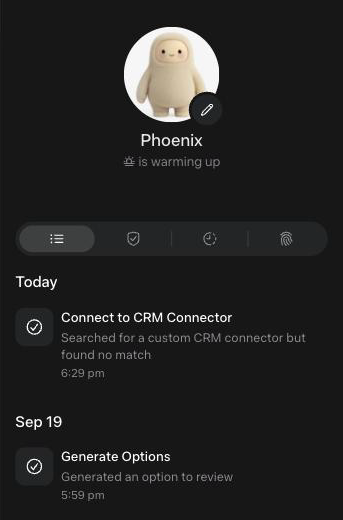
You can open Upcoming, Activity, Identity and Settings without searching for them.
Plans
| Plan | Price | Weekly usage |
|---|---|---|
| Free | $0 | Up to 100M tokens, per Zuckerberg at launch |
| Power | $20 a month | 500M Muse tokens |
| Maximum | $100 a month | 3B Muse tokens |
You must be 18, or the age of majority in your country, and in a supported region (the US at launch). Meta says paid plans are in limited testing. Start on Free. Browser tasks and recurring tasks use the most. Upgrade only if you hit the limit during the labs.
Set this before Lab 1
Open Settings›Permissions. Under Connector defaults and Web access defaults, choose Always ask. For this course you want to see every approval screen. You will loosen it later, on purpose.