Lesson · 30 min
Connectors, permissions and channels
Give Muse access to your apps one at a time, decide when it must ask, and talk to it from WhatsApp.
By the end you can
- Connect an app and set which of its actions need your OK.
- Set when Muse must ask before acting.
- Talk to Muse from WhatsApp.
Connectors
A connector gives Muse access to one app. Connect from Settings›Connectors and tap Connect, or type "Connect my Gmail". Facebook, Instagram and Threads connect on their own if they share your Accounts Center.
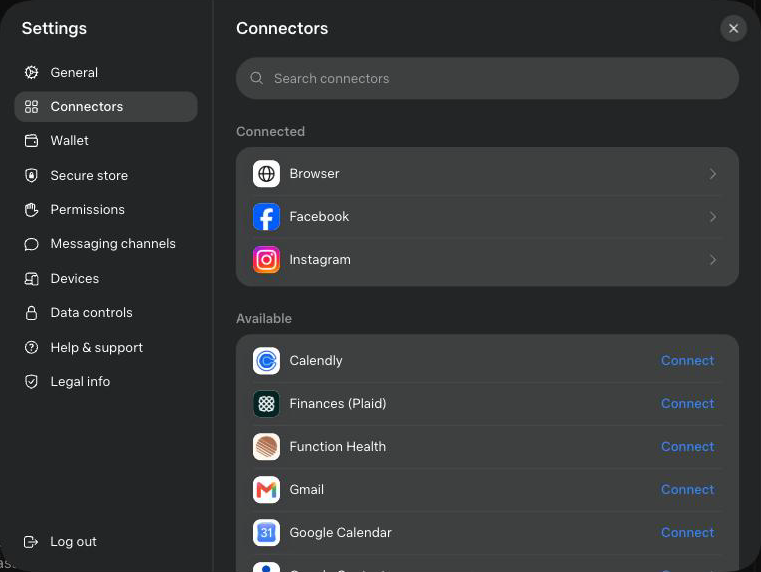
The list in September 2026, as shown in the app:
| Group | Connectors |
|---|---|
| Gmail, Google Calendar, Google Contacts, Google Docs, Google Drive, Google Forms, Google Sheets, Google Slides, Google Tasks | |
| Microsoft | Outlook Mail, Outlook Calendar, Outlook Contacts |
| Meta | Facebook, Instagram, Instagram Messages, Messenger, Threads, Threads Messages |
| Health | Function Health, HealthEx, Peloton, Withings |
| Home and car | Philips Hue, Tessie |
| Work | Calendly, Granola, Notion, Printify, Tailscale |
| Money | Finances (Plaid) |
| Going out | OpenTable, Spotify |
| Built in | Browser |
Meta adds connectors often. A search box at the top of the list finds them fast. For any app missing from it, Lab 7 shows you how to build your own.
Control what each connector can do
Tap a connected connector to see its actions, grouped under Read permissions and Write and delete permissions. Each action is set to Allow or Ask. With Ask, Muse shows you an approval screen before it acts. A Reset to defaults link sits at the bottom.
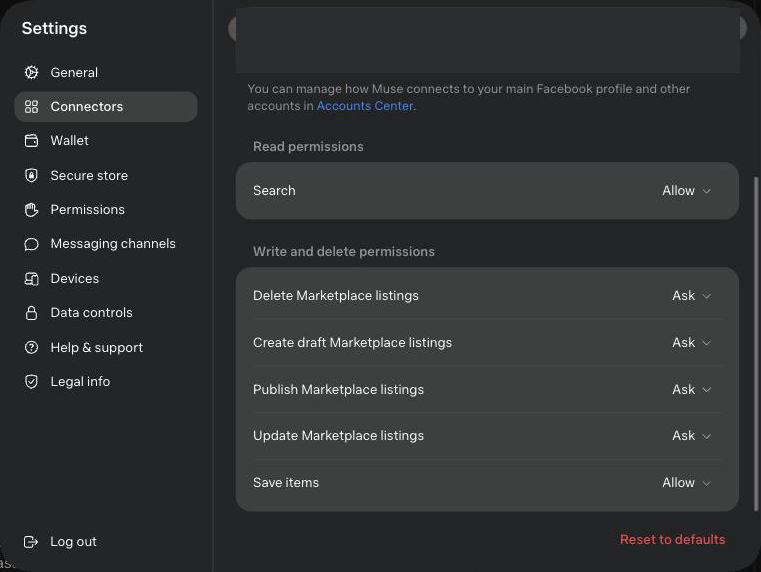
Keep write and delete actions on Ask while you learn. Read actions can stay on Allow.
Exercise: connect your calendar
Open Settings›Connectors and tap Connect next to Google Calendar. Tap it again once connected and check that write and delete actions are on Ask. Then ask: "What's on my calendar tomorrow?"
Keys and passwords
When Muse needs a password or key for a service, it opens a credential prompt, a separate secure page. What you type there goes to the Secure Credentials Store, listed under Settings›Secure store, and the model only sees a stand-in. Type keys and passwords only there.
Permissions
Open Settings›Permissions. There are two defaults, each with two levels:
| Setting | Ask for some actions | Always ask |
|---|---|---|
| Connector defaults | Before actions that may share your information or make important changes | Before any action |
| Web access defaults | When your information may be shared or the website is unfamiliar | Ask before accessing any website |
Set both to Always ask for this course.
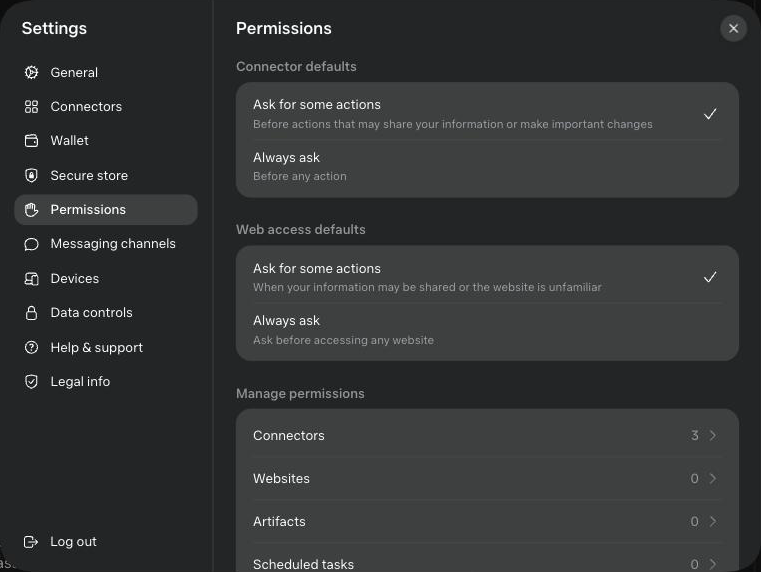
Below them, Manage permissions lists the rules you have set for Connectors, Websites, Artifacts and Scheduled tasks. Actions waiting for you also appear in the Approvals tab of your assistant's panel. When Muse asks, you get five choices:
| Choice | Use it when |
|---|---|
| Allow once | You want to see the next one too |
| Allow for this task | The task repeats the same action many times |
| Allow for this site | You trust Muse on one website |
| Always allow | Low-risk and you have seen it work |
| Deny | Anything you did not expect |
Meta says these checks run outside the main model, which makes them harder to trick.
Channels: Muse in WhatsApp
You talk to Muse through a channel, such as WhatsApp, and Muse reaches your apps through connectors, such as Gmail. WhatsApp works as a channel today. Settings›Messaging channels shows what else you can link.
- Open Settings›Messaging channels and link WhatsApp.
- From WhatsApp, send: "Remind me tomorrow at 9 am to drink water."
- Open the Muse app. Check whether the exchange shows up there, and whether the reminder is in Your assistant›Upcoming.
You started a task in WhatsApp and saw it in the app. Write down whether memory carries across.