Lesson · 25 min
Limits, safety and the Amazon block
Where Muse cannot go, the risks Meta admits to, and the privacy settings to check today.
By the end you can
- Say which sites block Muse and why.
- Name the risks Meta admits to.
- Turn off training on your data if you choose.
Case study: Amazon blocks Muse
On Sunday 20 September 2026, according to TechCrunch, Muse users trying to shop on Amazon got this message: "Continued access by an unauthorized AI agent violates Amazon's Conditions of Use, to which our customers have agreed."
Amazon's reasons, as reported by TechCrunch, GeekWire and Engadget:
- Meta did not get Amazon's permission, after Amazon had asked Meta to keep Amazon out of Muse's shopping.
- Muse does not identify itself as an AI agent when it browses.
- Muse can reach a customer's account and order history.
- Amazon has concerns about how login details are handled.
GeekWire reports Amazon has blocked agents from Perplexity, Google and OpenAI, and cites its Conditions of Use for Muse. Amazon says it is in talks with Meta.
What it means for you: an agent that works through a browser depends on each site allowing it. A site can block it overnight. For stores that block agents, have Muse build the list or compare prices, and buy it yourself. When Muse pays, it uses a Link by Stripe one-time card number or your saved account with the merchant. Meta says Shop Pay is coming as another way to pay, along with 1Password support.
Risks Meta admits to
- Prompt injection. Meta calls it "an open problem in the industry." An email or web page can hide instructions aimed at the agent. This is why Always ask exists.
- Mistakes. Meta: "Muse will sometimes make mistakes." Check anything involving money, dates, or other people.
Risks reported by others
- Human concierge test. Reuters, citing internal posts, reported that Meta tested a "human concierge" in which contractors placed some calls for Muse users without telling them. A Meta Superintelligence Labs VP called it "a miss".
- Mac app flaw. A security researcher reported a flaw in the Mac app that could expose access tokens, and security press reported a fix. reported Keep the app updated and give each Mac app the lowest access level it needs.
- Pre-launch testing. Reuters reported problems in Meta's internal tests, including Muse surfacing private photos.
Exercise: privacy settings
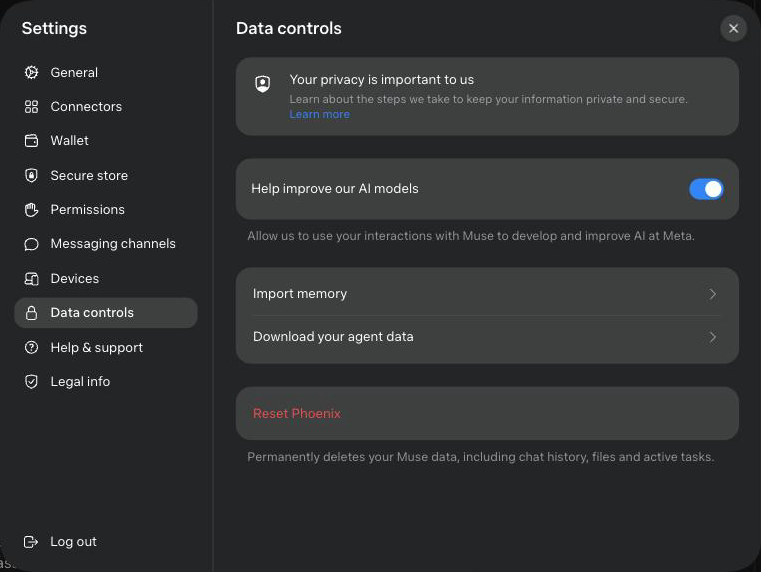
- Open Settings›Data controls. "Help improve our AI models" is on by default. Decide whether to turn it off.
- Find "Import memory", "Download your agent data" and the red Reset button, which carries your assistant's name. Do not tap Reset. It "permanently deletes your Muse data, including chat history, files and active tasks."
- Review each connector. Disconnect the ones you did not use.
- Review Settings›Permissions. Now that you have seen the approval screens, choose where "Allow for this task" is enough.
Meta says Muse "doesn't share your conversations or the data in your virtual machine with Meta ad systems."